
Barcode read rates in histology: What actually drives performance?
Background
Laboratories continue to automate workflows to improve efficiency, improve traceability, and reduce
errors. Reliable barcode scanning is foundational to this progress, directly impacting throughput, specimen
tracking, and ultimately patient safety.
When it comes to maximizing barcode scan rates on histology cassettes, four key factors determine success:
- Contrast – the difference between the printed barcode and the cassette color.
- Barcode Generation – how efficiently the barcode is created and optimized.
- Surface Quality – the characteristics of the cassette surface being printed.
- Resolution (DPI) – the sharpness and consistency of the printed image.
Contrast: The Most Important Factor
Histology laboratories rely on a wide range of cassette colors for specimen identification and workflow
management. Regardless of color, every barcode must be scanned reliably throughout the sample management process.
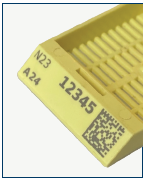
The single most important determinant of barcode readability is contrast—the difference between the darkness of the printed barcode and the background color of the cassette. Higher contrast enables scanners to more easily distinguish barcode elements, resulting in higher first-pass read rates, reduced rework, and fewer identification errors.
Systems such as the StatLab PiSmart Printer and StatLab cassettes are optimized to maximize contrast across the standard range of cassette colors. This not only improves scan performance but also allows laboratories to safely utilize a broader range of cassette colors without compromising barcode readability. In contrast, UV laser systems print on a limited range of cassette colors, reducing cassette color options unnecessarily.
Image 1. StatLab PiSmart Printed Laser Cassette
Barcode Generation Matters
Not all barcode generation software produces the same results.
The size, shape, and structure of a barcode significantly influence how easily it can be decoded. As the amount of data stored within a barcode increases, the software must balance information density with readability.
Equally important is the size of the individual dots or modules that form the barcode. Very small modules create more complex patterns that can reduce scanner performance, particularly in real-world laboratory environments where barcodes may be viewed from varying angles or distances.
Two barcodes may contain identical information, yet one can be significantly easier to scan simply because it has been generated using more effective sizing and spacing parameters.
For example, the barcodes shown in Image 2 below contain identical data, but differences in module size, spacing, and symbol structure make one inherently easier to scan than the other.
Image 2. UV Laser vs. IR Laser
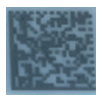
UV Laser
2500 DPI
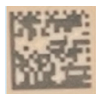
IR Laser
600 DPI
Resolution (DPI): Important, But Only to a Point
Resolution is commonly measured in dots per inch (DPI) and is often used as a benchmark for print quality. However, when it comes to cassette barcodes, higher DPI does not automatically translate into better scan rates.
At 600 DPI, barcode elements are already significantly sharper than the resolution required by both barcode scanners and the human eye. Once barcode edges are crisp and contrast is sufficient, increasing resolution provides little to no improvement in decode reliability.
Barcode scanners do not read individual dots; they detect transitions between light and dark areas. At 600 DPI, these transitions are already well within the capabilities of modern scanners. Increasing resolution to 1200 DPI or 2400 DPI simply adds detail that the scanner cannot effectively utilize.
For laboratories focused on first-pass scan success, controlled contrast and consistent print quality are far more important than maximizing DPI specifications.
Why the StatLab IR Laser System Delivers Superior Results
The StatLab PiSmart system has been designed around the factors that truly influence barcode
- StatLab cassettes are optimized to maximize contrast, enabling reliable printing on all nine standard cassette colors and three additional colors while maintaining 100% barcode scan rates.
- The printer, cassette, and consumable components are engineered as a complete system to optimize print quality, scanner performance, and operational reliability.
- The integrated Label Designer automatically optimizes barcode sizing and module dimensions, producing highly readable barcodes even when larger amounts of text data are included.
- StatLab print resolution exceeds the practical requirements of both barcode scanners and human visual inspection, ensuring consistently reliable barcode production.
- Because the entire system is optimized to work together, StatLab is able to offer extended warranties of up to four years when approved consumables are used.
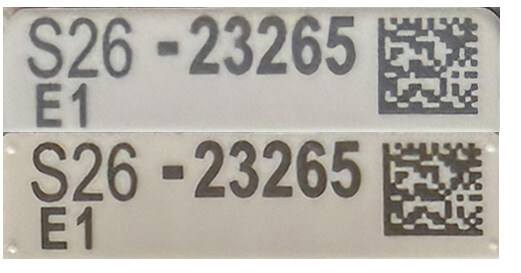
Image 3. Competitor (top) vs PiSmart (bottom) Cassettes
Conclusion
Achieving high barcode scan rates is not simply a matter of increasing DPI. The factors that truly drive barcode performance are contrast, barcode design, surface quality, and consistent print execution.
By optimizing each of these elements, the StatLab PiSmart system provides laboratories with reliable barcode readability across a wide range of cassette colors and applications. The result is improved workflow efficiency, reduced rework, enhanced specimen traceability, and confidence that every barcode will scan when it matters most.
Recent Posts
-
StatClick Prefill Handling and Closure
How to properly handle and close the StatClick Prefill for leak-proof transport. Follow your facili
-
Silver stains start here: clean glassware.
We’ve all had that glassware that looks clean—but silver stains can tell a different story. Tiny tra
-
Color Matters: 10 tips for getting the most from Tissue Marking Dyes.
Tissue Marking Dyes may seem like a simple part of the grossing workflow, but small handling habits