
Choosing the right slides for your printer.
Highest quality slide printing enhances specimen identification.
StatLab KT™ slides and the PiSmart Slide Printer prove to be a powerful combination.
StatLab is dedicated to innovating labeling solutions that enhance efficiency and accuracy in laboratories. The focus on improving patient sample integrity and reducing maintenance time for slide printers demonstrates our commitment to addressing common challenges faced in laboratory settings, such as identifying difficult-to-read slides and reprinting cases. By developing products that work together seamlessly and aiming for industry-leading quality, StatLab strives to streamline processes and ultimately improve overall laboratory operations.
A test was designed to assess the print quality of the StatLab KT1 Premium Non-Adhesion Slides and the KT5+ Premium Adhesion Slides in the PiSmart slide printers. This test assesses the clarity, contrast and consistency of printed text as well as positive scan rates of barcodes. An initial assessment would be made to determine the optimal range of heat settings that would produce best printing results. Slides of each type would be printed and collected, then slide print quality would be assessed for readability of printed text using the following Evaluation Criteria:
- Clarity: Assess the sharpness and clarity of the printed characters and images
- Contrast: Evaluate the contrast between printed ink and the slide background
- Consistency: Ensure that print quality remains consistent across multiple slides printed at the same heat settingThe slides would then be assessed for scanability using a Zebra handheld scanner.
Conclusion
The StatLab KT1 and KT5+ slides were initially tested to determine the recommended heat setting range that would produce the best printing results. Initial assessment determined
that a setting between 7 and 9 would work best. During test printing, ribbon breaks did not occur indicating that printer heat settings between 7 and 9 on KT™ slides does not increase the risk of ribbon breaking. A batch of 620 StatLab KT5+ Premium Adhesion Slides and a batch of 1,000 StatLab KT1 Premium Non-Adhesion Slides were printed at a middle setting of 8. The slides were assessed for print quality and positive scans (Figure 1).
-
- All slides printed in dark text and provided high contrast to the white background.
- The letters and numbers were easy to read.
- All slides printed with very similar and consistent print.
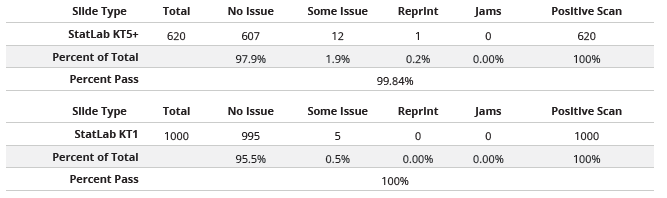
- N = 620 slides
- Print quality pass rate: 99.84%
- Positive scan rate: 100%
- Jam-free operation: Yes
- These slides have demonstrated high quality printing with minimal issues such as jams or errors during the printing process.

- N = 1,000 slides
- Print quality pass rate: 100%
- Positive scan rate: 100%
- Jam-free operation: Yes
- These slides also show excellent performance, achieving
perfect print quality and trouble-free operation.

- Combined with StatLab KT™ Slides, the PiSmart slide printer produces near perfect results.
- Offers a wider temperature “sweet spot,” making any PiSmart printer that is working properly and with original factory heat settings, would likely never have a ribbon burn event.

Recent Posts
-
KT Slides & Background Staining
Background Whole slide imaging (WSI) is gaining widespread adoption in diagnostic and research path
-

Happy National Histotechnology Professionals Day!
Thank you for the vital role you play in providing the best possible patient care. We see your hard
-
Why HCA Mid-America Division only uses KT slides in their lab.
One lab's story of overcoming tissue wash challenges.